
What is a Confirmation Statement?
A CS01 form, often referred to as a confirmation statement, confirms the accuracy of the crucial data that Companies House maintains. Private limited businesses and limited liability partnerships (LLPs) are required to deliver it at least once every 12 months. The company's fundamental details, such as the following: business filing business filing business filing business filing business filing
- Directors of companies
- Address of the registered office
- Status of trading
- Codes for SIC (Standard Industrial Classification)
- People with Significant Control (PSCs)
You still need to submit a confirmation statement to ensure that the current information is accurate, even if none of your company's data have changed.
For your first confirmation statement following 18th November 2025, directors must be verified by filing a confirmation statement. You will need to add your verification code for each director to you confirmation statement. cs01 form cs01 form cs01 form cs01 form cs01 form cs01 form
When is the deadline?
The filing deadline for Confirmation Statements varies depending on the company. Generally, you must file your Confirmation Statement on the anniversary of your previous Confirmation Statement or, in the case of a new company, the day before the anniversary of the date of incorporation. Confirmation Statements must be filed at least once every 12 months. Companies House refer to this 12-month term as the "review period". Your Confirmation statement may be submitted up to 14 days after the deadline.
What information changes about your business can be reported by submitting a Confirmation Statement?
Changes that can be reported consist of:
- Codes for the Standard Industrial Classification (SIC)
- Capital Statement
- Details of shareholders
However, other Companies House forms must be used to notify any changes, such as those relating to the officers' personal information, People with Significant Control (PSCs), and Registered Office.
How can I use Easy Digital to submit a confirmation statement?
Confirmation statement filing is quite simple and shouldn't take longer than ten minutes! You can do it in a few steps, which are listed below:
1) Locate the business for whom you want to submit the Confirmation statement by logging into your Easy Digital account.
2) Click the blue "Add Filing" button on the company's "Filings view" page, then choose "Companies House templates" from the Filter column.
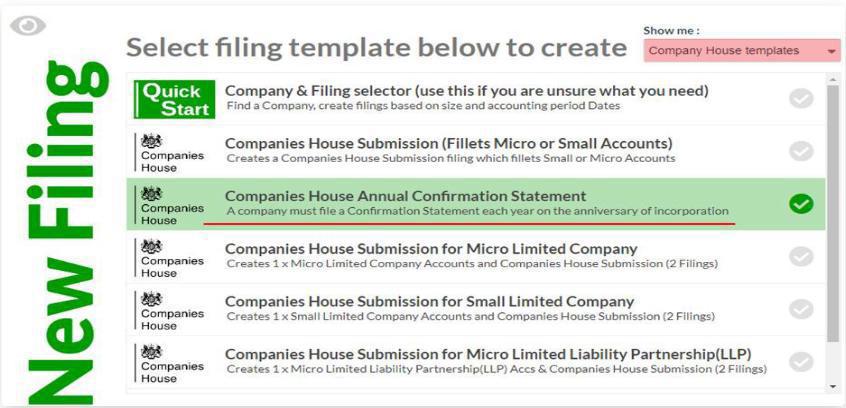
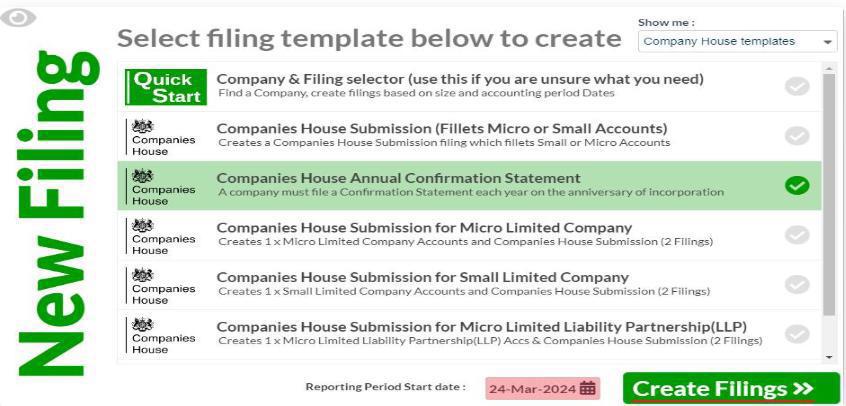
3) Click "Create Filings" after selecting the "Reporting Period Start date."
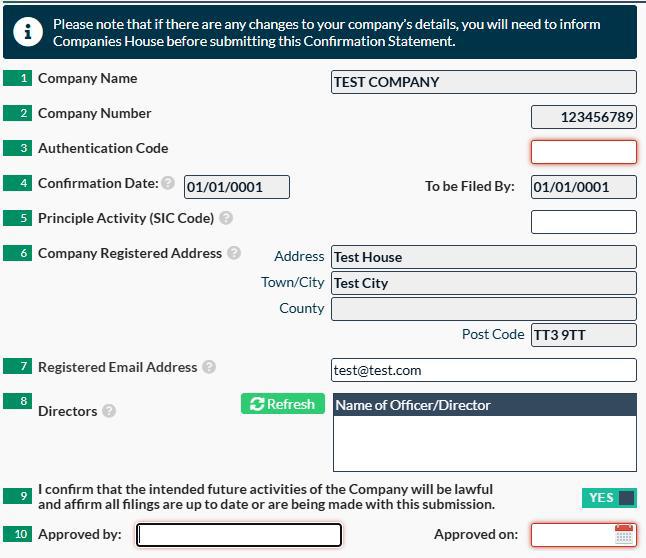
4) Double-check the pre-populated data after opening the Confirmation statement template. If all the information is accurate, you can enter the registered email address in box 7, confirm that the company's planned future operations will be legal in box 9, and then enter the name of the person authorising the submission along with the approval date in box 10.
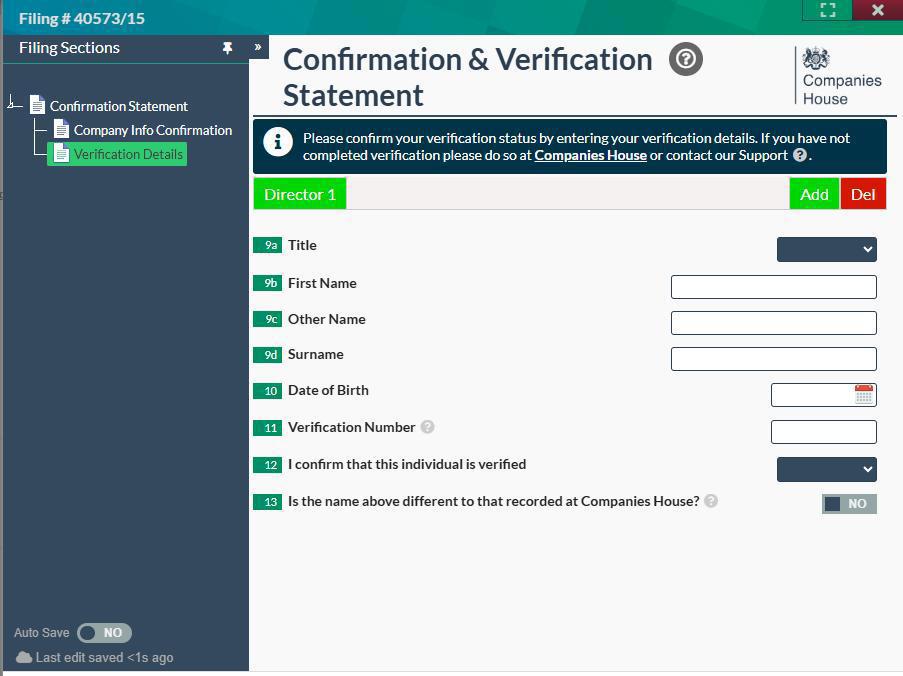
5) The confirmation statement now includes a new section due to the recently implemented Identity Verification. By selecting 'Verification Details' from the left-hand tool bar, you can access this within your template.
6) Choose your title in Box 9a to begin filling out the new "Verification Details" page. Next, input your first name (Box 9b) and surname (Box 9c). Note: When confirming your identity, the names you submit must match the ones you gave to Companies House. The 11-character unique Verification Number of the officer filing the return should be entered in Box 10. The final boxes that must be filled out are Box 13, which must be checked to "Yes" to indicate that the company's planned future operations will be legal, and Box 14, which must contain the date the confirmation statement was approved as well as the name of the person who approved it.
7) When you are prepared to submit your Confirmation statement, click the flashing arrow in the "Submit/Result" column after setting the filing to "Ready to File."

Failing to submit annual Confirmation statement is a criminal offence, and although there is no financial penalty charge that is imposed for filing after the deadline, if the confirmation statement is not filed at all, Companies House will start legal proceedings against the company and its directors with the final phase being the dissolution (removal) of the entity from the Companies House register.